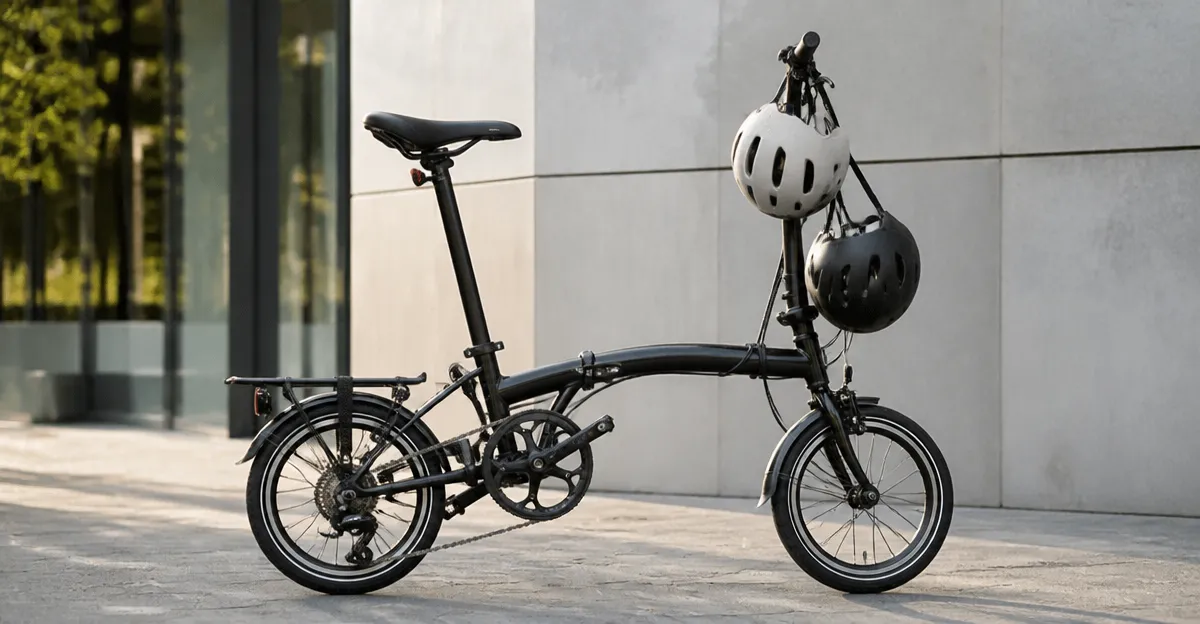
How to Carry Two Helmets on One Folding Bike: Practical Brompton & Schwinn Methods
Introduction
Commuters who own more than one helmet often struggle to find a reliable method for transporting both without compromising bike stability. This guide explains how to secure two helmets on a folding bike, focusing on popular Brompton and Schwinn models. Readers will learn a systematic approach that leverages elastic cargo nets to keep helmets stable during rides and folds. By following these instructions, cyclists can protect their gear, reduce wear, and maintain a sleek profile.
What You'll Need
- One elastic cargo net sized 15" x 15" (or larger) – examples include Topeak Cargo Net, PowerTye Black Cargo Net, PowerTye Red Cargo Net, JCHL Cargo Net, or Delta Cycle Cargo Net.
- Four attachment points on the bike: front basket or rack, rear rack, handlebar stem, and seat post clamp.
- Optional: small zip ties or Velcro straps for extra security.
- A clean, dry workspace for initial net tension adjustment.
Step 1 – Prepare the Bike Frame and Identify Anchor Points
Begin by inspecting the folding bike for sturdy anchor points where the net hooks can attach without damaging paint or finish. Most Brompton models feature a front basket with reinforced edges, while Schwinn bikes often include a rear rack and a front carrier. Locate the handlebar stem clamp and the seat post clamp; these are ideal for distributing load evenly across the frame. Ensuring that each anchor point is free of debris will improve hook grip and prevent slippage during rides.
At this stage, consider the net that best matches the bike's geometry. The Topeak Cargo Net measures 15.7" x 15.7" and includes coated hooks that protect the bike surface. Its compact size makes it ideal for the limited space on a Brompton basket, while the elastic nylon construction offers reliable tension without excessive bulk.
If the bike has a larger rear rack, a net with greater stretch may be advantageous. The PowerTye Black Cargo Net stretches to 30" x 30" and features a tighter 2" x 2" mesh that prevents small items from falling through. This characteristic is useful when the helmets are positioned side‑by‑side, as the net can conform to the combined shape without creating gaps.
Mark each anchor point with a piece of masking tape to streamline hook placement during the next step. This simple visual aid reduces the time spent readjusting hooks while the net is under tension.
Step 2 – Position the Helmets for Optimal Balance
Place the first helmet in the front basket or on the rear rack, ensuring that its weight is centered over the wheel axle. Position the second helmet directly behind the first, aligning the straps so that the helmets sit side‑by‑side rather than stacked. This arrangement distributes weight evenly and prevents the bike from leaning to one side when riding.
When using a Brompton, the folded frame creates a narrow profile; therefore, orient the helmets vertically to maximize clearance. For a Schwinn, a horizontal orientation may be more comfortable if the rear rack is wide enough. Verify that the helmets do not interfere with the folding hinge or the brake cables.
Before attaching the net, test the balance by gently rocking the bike. If one side feels heavier, adjust the helmets by sliding them a few centimeters until equilibrium is achieved. This pre‑emptive step reduces the likelihood of net slippage later on.
Once the helmets are balanced, note the distance between the outermost points of the helmets; this measurement will guide the amount of net stretch required.
Step 3 – Attach the Cargo Net Using the Coated Hooks
Start by securing the first hook of the chosen net to the front basket or rack anchor point. The Topeak Cargo Net uses durable, coated hooks that prevent scratches, making it safe for both aluminum and steel frames. Pull the net across the helmets, ensuring the elastic material is taut but not overstretched.
Proceed to attach the second hook to the opposite side of the same anchor, creating a horizontal tension line that holds the helmets together. For larger nets such as the PowerTye Black Cargo Net, use the adjustable sub‑hooks to fine‑tune the grip; this flexibility allows you to accommodate the extra stretch needed for two helmets.
Next, secure the remaining two hooks to the handlebar stem and seat post clamps. This diagonal configuration forms a criss‑cross pattern that locks the helmets in place from multiple angles. The 6‑hook design of the PowerTye Red Cargo Net provides exactly the number of attachment points required for a secure, triangulated setup.
After all hooks are engaged, gently pull each corner of the net to verify that the tension is evenly distributed. The net should hug the helmets without excessive sag, and the mesh should remain taut enough to prevent movement during bumps.
Step 4 – Test Stability and Adjust Tension
With the net fully attached, lift the bike and simulate a short ride by walking a few meters while holding the handlebars. Observe whether the helmets shift or the net loosens. If any movement is detected, release the nearest hook, reposition it a few centimeters higher or lower, and re‑tighten.
The JCHL Cargo Net offers premium latex bungee elasticity that retains tension over repeated cycles, making it ideal for riders who frequently fold and unfold their bikes. Its small 2" x 2" mesh also prevents helmet straps from slipping through the net.
For cyclists who require a larger stretch range, the Delta Cycle Cargo Net expands from 10" x 10" to over 22" x 22", allowing extra slack for bulky helmets while still delivering a firm grip. Adjust the net until the helmets feel locked in place but the net is not overstretched, as excessive tension can degrade the bungee material over time.
Perform a final check by gently shaking each helmet; a properly tensioned net will absorb the motion without allowing the helmets to bounce out of position.
Step 5 – Fold the Bike and Secure the Net for Transport
When it is time to fold the bike, release the net from the handlebar stem and seat post clamps first, as these points are the most likely to interfere with the folding hinge. Keep the net attached to the front basket and rear rack, as this maintains a barrier that prevents the helmets from contacting the frame during folding.
Fold the bike according to the manufacturer's instructions, ensuring that the net does not become twisted. If the net becomes loose during folding, re‑attach any loose hooks before proceeding. The coated hooks on the Topeak Cargo Net are designed to snap back into place quickly, reducing the time required for re‑attachment.
Finally, store the folded bike in a protected area. The net, when left attached to the basket, also serves as a protective cover for the helmets, shielding them from dust and minor scratches.
Tips & Pro Tips
- Use a net with a tighter mesh (2" x 2") when transporting helmets with removable visors to avoid visor slippage.
- Periodically inspect the hooks for wear; the PowerTye Black Cargo Net includes a “hook guarantee” that offers free replacement if a hook breaks.
- For added security on long commutes, supplement the net with a lightweight Velcro strap that wraps around the net's center line.
- When riding on rough terrain, keep the net tension slightly higher to counteract increased vibration.
Troubleshooting
Net Slips Off Hooks: This usually occurs when the hooks are not fully engaged. Re‑insert each hook until it clicks into the coated slot, and verify that the surface is clean of oil or dust.
Helmets Shift During Ride: Adjust the net’s diagonal tension by moving the handlebar and seat post hooks outward, creating a tighter criss‑cross pattern.
Net Loses Elasticity Over Time: Replace the net after several months of heavy use. The PowerTye Red Cargo Net is built with 4.4mm thick bungee material that retains stretch longer than standard cords.
Conclusion
Carrying two helmets on a folding bike no longer requires improvisation or bulky saddlebags. By selecting an appropriate elastic cargo net and following a systematic attachment process, cyclists can secure their helmets safely, maintain bike balance, and preserve the sleek aesthetic of their Brompton or Schwinn. The methods described herein combine practicality with durability, ensuring that riders enjoy peace of mind on every commute.
Frequently Asked Questions
What is the easiest way to secure two helmets on a Brompton folding bike?
Use a 15" x 15" elastic cargo net stretched over the rear rack or frame, positioning the helmets side‑by‑side and tightening the net to prevent movement.
Can I use the same method on a Schwinn folding bike?
Yes, attach the cargo net to the Schwinn’s rear rack or frame loops and secure the helmets in the same side‑by‑side arrangement.
Do I need a specific size of cargo net for two helmets?
A net at least 15" x 15" works for most helmets; larger nets provide extra slack and easier tightening.
Will carrying two helmets affect the bike’s folding mechanism?
When the net is snug, helmets stay stable and do not interfere with the folding hinge or latch.
How can I prevent helmet wear while using a cargo net?
Place a soft cloth or small towel between the helmets and the net to cushion any pressure points.